
Cloud Penetration Testing: Process and Limitations
Cloud penetration testing is a specialized security examination that identifies vulnerabilities, misconfigurations, and lax access controls in cloud systems such as AWS, Azure, and Google Cloud. It enables enterprises to understand the security posture of their cloud infrastructure by simulating real-world attack scenarios while adhering to provider standards and the shared responsibility model. The testing process typically comprises planning, enumeration, vulnerability analysis, exploitation, and reporting to identify hazards in IAM roles, storage, networking, and serverless services. However, it has limits, such as provider constraints, limited visibility, and the requirement for correct authorization. Overall, cloud penetration testing is critical to improving cloud security and assuring compliance with best practices.
Understanding Cloud Computing
The term cloud is widely used and can often be misunderstood, so it’s important to clarify its meaning before moving forward.
As described in NIST SP 500-291, cloud computing includes the following core features:
On-Demand Self-Service – Users can set up and manage computing resources by themselves whenever needed.
Wide Network Accessibility – Cloud services can be reached over the internet from various devices and locations.
Resource Sharing – Computing resources are combined and distributed among multiple users according to demand.
Scalability and Flexibility – Services can expand or shrink quickly to match workload changes.
Usage-Based Measurement – Resource consumption is automatically tracked and monitored for transparency and billing.
Unique Features of Cloud Computing
Cloud providers modernize traditional data centers by adding automation and scalability.
Self-Service: Users can create and manage resources without direct hardware access.
Elastic Tools: Providers offer built-in tools to scale environments as needed.
Resource Limits: Continuous availability (like vMotion) isn’t always supported without extra services.
High Availability: Applications must be designed for reliability.
Internet Exposure: Easy access can lead to accidental data leaks.
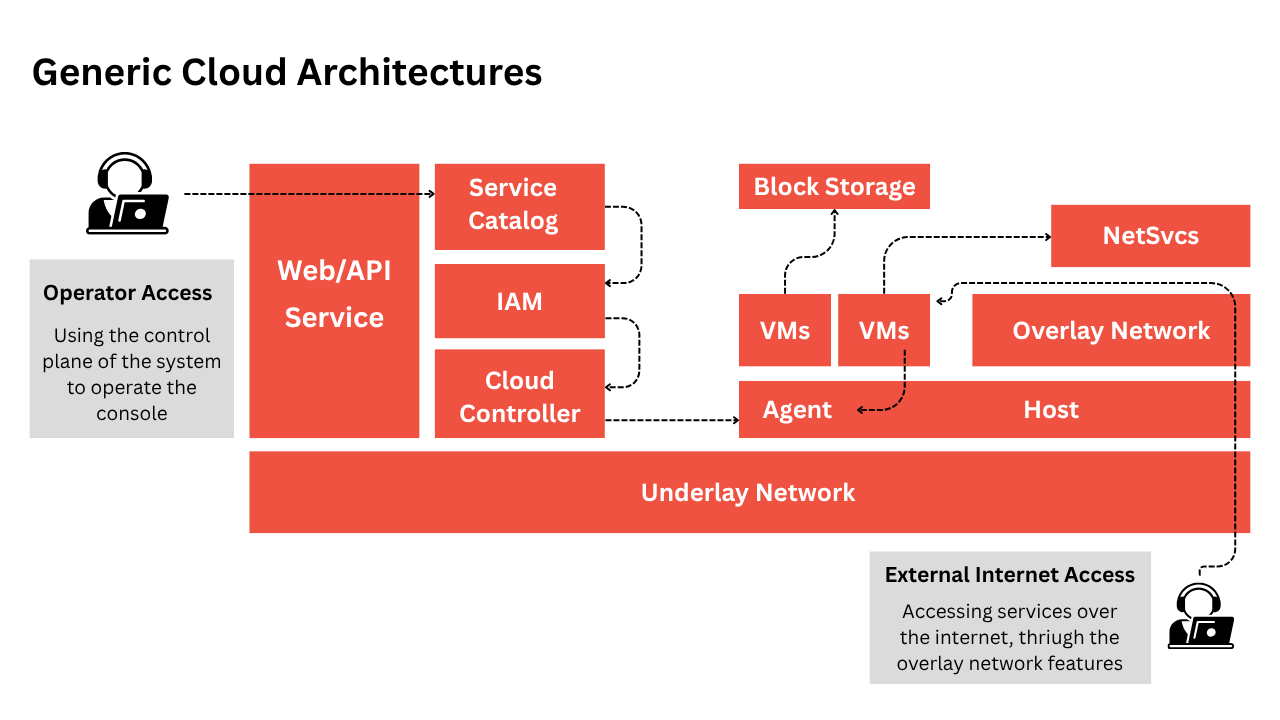
Cloud Penetration Testing Approach
Cloud-based penetration testing follows a different flow compared to traditional on-premise assessments. In classic tests, the scope is often predefined with clear targets such as data centers, IP ranges, web applications, and endpoints. In contrast, cloud testing focuses more on dynamic and scenario-driven approaches.
1. Traditional (Non-Cloud) Testing
Usually performed as an external-to-internal assessment.
When the environment includes cloud resources, only a portion of the test may cover those components.
2. Cloud-Focused Testing
Primarily scenario-based, often referred to as “Assumed Breach” testing.
Common scenarios include:
A compromised user or developer account.
A breached server or container as the initial entry point.
These simulations help evaluate response, privilege escalation, and lateral movement within the cloud environment.
3. Common Ground
Both cloud-native and external-to-internal tests may reveal similar types of vulnerabilities, such as misconfigurations or weak access controls.
4. Testing Limitations
It’s important to note that testers may not always reach or simulate every breach scenario, depending on scope boundaries and access constraints.
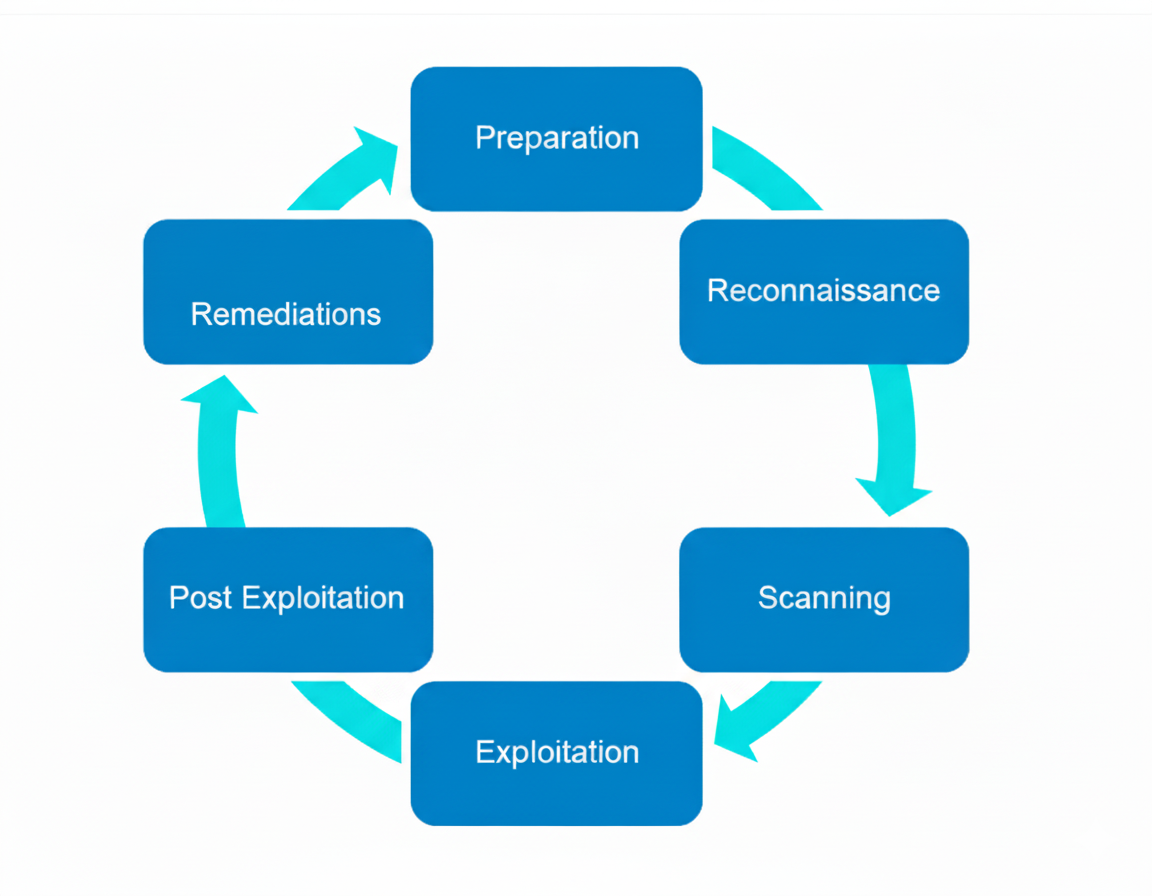
Types of Cloud Services:
Understanding which cloud model you’re testing is essential for any penetration tester or red‑team operator — it determines what’s fair game and what’s off‑limits.
1. Software as a Service (SaaS)
SaaS exposes an application to users while the provider manages everything behind it. For testers, the focus is on data and account security rather than exploiting the underlying application itself.
Typical testing goals:
Verify whether sensitive data is accessible inappropriately.
Look for abused or tricked authentication mechanisms (for example: misused OAuth tokens, leaked API keys, or saved service credentials).
Test for account compromise and misuse — weak password policies, poor session controls, or ways to bypass MFA.
Note: Directly exploiting the provider’s application internals is generally out of scope.
2. Platform as a Service (PaaS)
PaaS sits between SaaS and IaaS: users control their apps and runtimes, but the provider manages much of the platform stack. Containers and orchestration platforms are modern descendants of the PaaS concept.
Typical testing goals:
Focus on the application and its runtime environment.
Stop at the point where breaking out of a container or escaping the managed environment would be required.
Customers typically own the application layer; the provider owns most other layers.
3. Infrastructure as a Service (IaaS)
IaaS gives customers the most control — virtual machines, block storage, and virtual networking — and therefore often the broadest attack surface.
Common targets and concerns:
Compute: Virtual machines are usually in scope and secured according to the customer’s configuration; poor admin practices can leave them wide open.
Storage: Block or object storage can be misconfigured and expose files or backups without authentication.
Networking: When standard on‑premise controls are limited or missing in a cloud network, it can create new exploitation paths.
Public Cloud Provider Testing Guidelines
Every public cloud provider has its own rules and guidance for customers who want to test security within their environments. These policies define what is permitted, how testing should be conducted, and any restrictions to ensure safe use of the cloud.
Clarity varies across providers:
Some, like Amazon Web Services (AWS), provide detailed, explicit guidance on what testing activities are allowed.
Others, such as Google Cloud, may provide more general or less specific instructions.
Key providers to understand:
Amazon Web Services (AWS)
Microsoft Azure
Google Cloud Platform (GCP)
Conducting Security Testing on Amazon Web Services (AWS)
Amazon Web Services (AWS) offers clear guidelines for security testing in its environment, enabling certain actions without specific prior clearance. Understanding the bounds of permissible testing is crucial for remaining compliant and not affecting other customers.
Authorized Testing on AWS
AWS allows penetration testing for a defined set of services, including:
Compute & Networking: EC2 instances, NAT Gateways, Elastic Load Balancers
Databases & Content Delivery: RDS, Aurora, CloudFront
Serverless & Application Services: Lambda, Lambda@Edge, Elastic Beanstalk, LightSail
APIs & Gateways: API Gateway
More detailed information is available on their official penetration testing page: AWS Penetration Testing Guidelines
Testing Restrictions
AWS explicitly forbids certain types of testing that could disrupt services or impact other tenants:
DNS zone walking using Route 53
Denial-of-Service (DoS) or Distributed Denial-of-Service (DDoS) attacks, including simulated versions
Flooding attacks targeting ports, protocols, or API requests
Simulated DDoS testing may be permitted only if your service or tool is on AWS’s approved list. Any testing that risks affecting other customers is considered a violation of AWS policies.
Conducting Security Testing on Microsoft Azure
Microsoft provides straightforward instructions for clients that want to test their Azure setups. Although some past constraints, such as necessary pre-approval, have been removed, testers must still adhere to Microsoft’s unified Rules of Engagement and avoid activities that may impact shared infrastructure or other tenants.
What you may test (typical, permitted activities)
When you own the target resources and follow MS rules, standard tests you can perform include:
Endpoint assessments (OWASP‑style web app testing and API checks). Microsoft Learn
Port scans and surface discovery for assets you control. Microsoft Learn
Fuzzing and standard vulnerability discovery on your deployed services. Microsoft Learn
Note: Microsoft’s guidance emphasizes testing only your Azure resources and staying within the documented Rules of Engagement. Microsoft
What is explicitly not allowed
Some activities are disallowed because they could destabilize the platform or impact other customers:
Any form of Denial‑of‑Service testing (real or simulated). Microsoft Learn
Tests that could cause collateral damage to tenants or shared services. Microsoft
Using Azure infrastructure to attack external third‑party targets (this can violate Acceptable Use).